Scheduling
7 minute read
Portfolio » Scheduling
Improving scheduling decisions to drive adoption and retention
Manage Schedule is a core feature used by managers to plan and staff shifts. It plays a critical role in daily operations and directly impacts how teams are staffed.
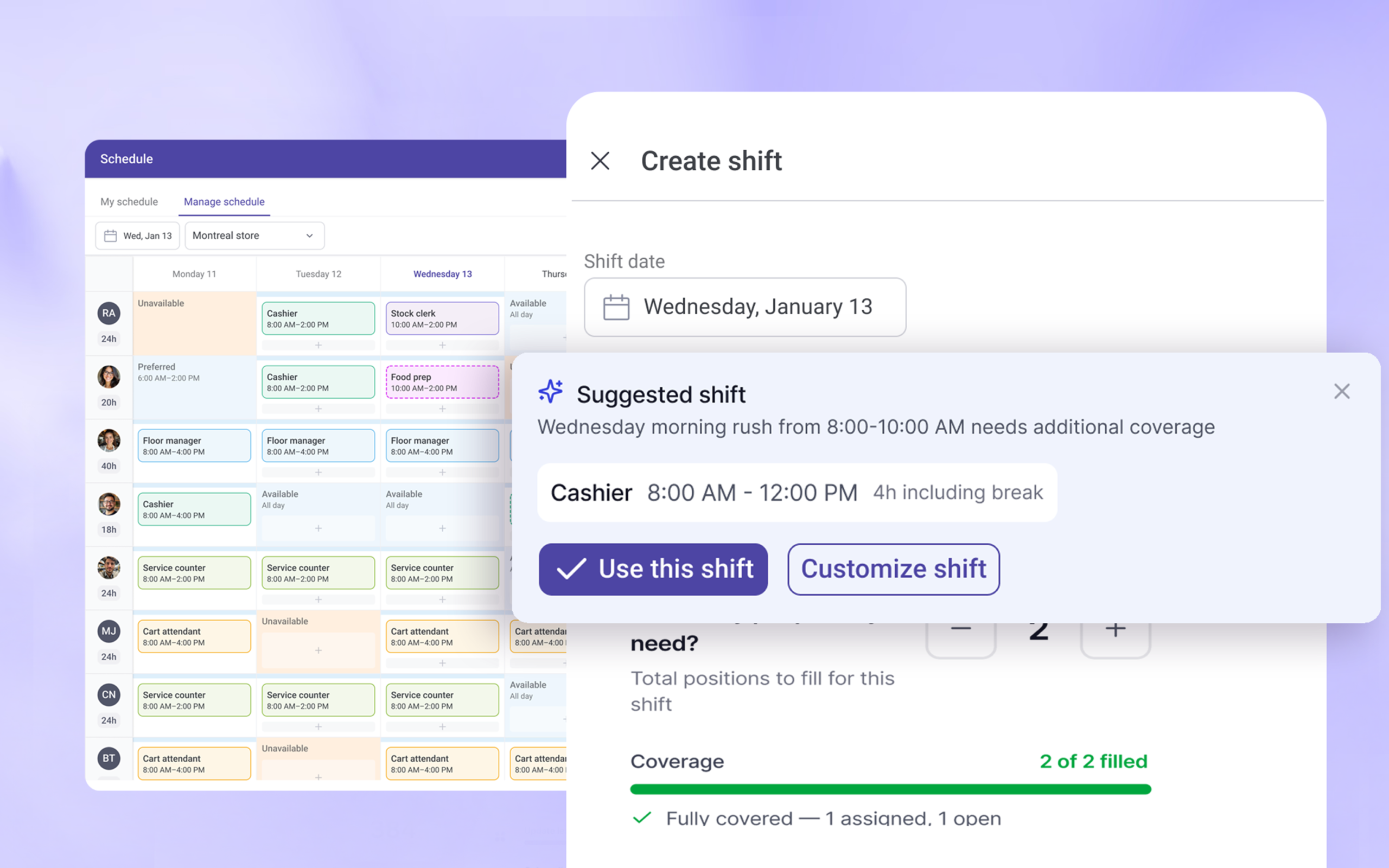
Despite being used by about half of WorkJam’s customers, the experience had not been meaningfully updated in several years. Incremental fixes addressed immediate issues but did not improve the overall workflow.
At the same time, newer competitors were offering more modern and intuitive scheduling tools.
This created a clear business need:
Increase adoption among existing customers
Improve retention by making scheduling easier and more reliable
The ask
The initial request was to redesign Manage Schedule to modernize the interface and improve usability.
While the direction was clear, the problem itself was loosely defined. It was unclear whether the issue was visual, structural, or related to how scheduling decisions were supported.
Where i started
Before proposing solutions, I focused on understanding how scheduling actually worked.
I mapped the system with my product manager and identified the key inputs and dependencies:
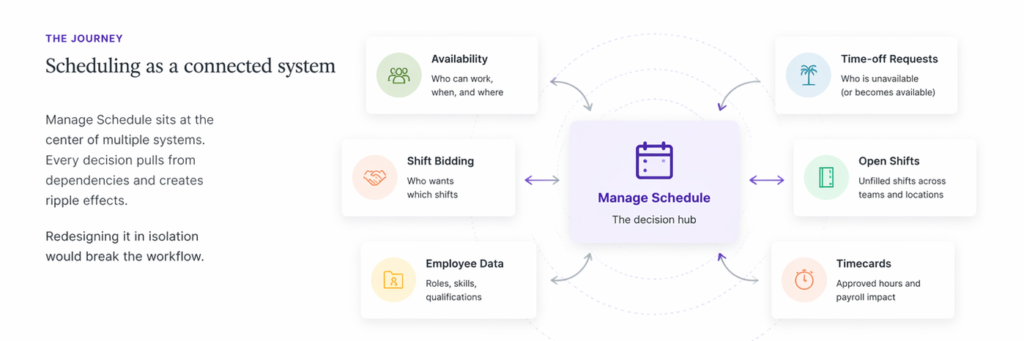
Every scheduling decision depended on this information and influenced downstream outcomes.
Mapping these dependencies helped clarify that Manage Schedule functioned as a decision point within a broader system.
Early collaboration
From the start, I partnered closely with my product manager and engineering to align on scope, constraints, and technical dependencies.
Mapping the system was a collaborative effort. It helped us build a shared understanding of how scheduling worked across availability, time-off, and staffing systems.
This early alignment ensured we were solving the right problem and reduced rework later in the process.
Research
To understand how managers approached scheduling, I conducted interviews and reviewed feedback from customer-facing teams.
Managers described a process that required constant checking, adjustment, and validation.
Common challenges:
Uncertainty around how to structure shifts
Difficulty deciding how to staff them
Reliance on trial and error
Across research and system mapping, four patterns emerged:
Lack of visibility
Managers could not see how shifts were structured or how decisions would impact coverage.
Fragmented workflow
Information was spread across multiple areas, requiring frequent context switching.
Cognitive load
Managers needed to track too many variables at once.
Trial-and-error behaviour
Decisions were validated after execution instead of before.
Scheduling required managers to make fast operational decisions, yet the system did not provide the information needed to understand those decisions.
This led to slow, inconsistent scheduling and reduced confidence in the outcome.
Revised problem statement: How might we reduce trial and error in scheduling by making shift structure and staffing outcomes clear before managers take action?
Finding the critical moments
When I mapped the scheduling flow end to end, I was looking for the moments where the system’s invisibility caused the most damage; not just inconvenience, but real operational cost.
Two moments emerged consistently regardless of the manager’s experience level.
Moment 1
Defining a shift
Shifts were treated as simple time blocks. Roles, break sequencing, and applicable rules were never surfaced. Managers were left asking “what should this shift look like?” with no feedback to anchor them. The result was hesitation, rework, and inconsistent schedules.
Moment 2
Filling a shift
Assigning, offering, and posting open shifts appeared as three separate unrelated actions. Managers weren’t sure which to use, whether they could combine them, or what would happen if they did. The result was confusion, trial and error, and slower coverage decisions.
MVP scope
The MVP focused on improving decision-making at these two moments.
Make the structure of a shift visible when creating it
Make the logic of staffing visible when filling it
Real-time operational decisions were identified as important but were scoped for a later phase.
Solution part 1 — Defining a shift
The system required shifts to follow specific rules, but those rules weren’t visible in the UI. The goal was to make the structure of a shift clear at the moment it’s created.
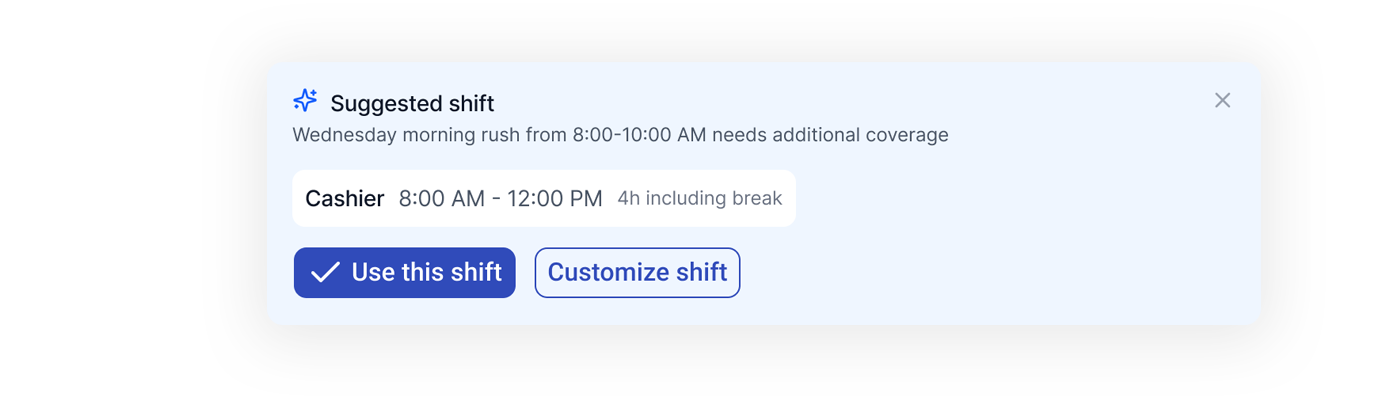
Start with a suggestion, not a blank state
Decision
Provide a system-generated starting point based on identified staffing gaps.
Managers often knew there was a gap. They just didn’t always know how to structure a shift to fill it. A suggested role, time, and duration gave them something to react to rather than something to construct from nothing.
Make the shift structure explicit
Decision
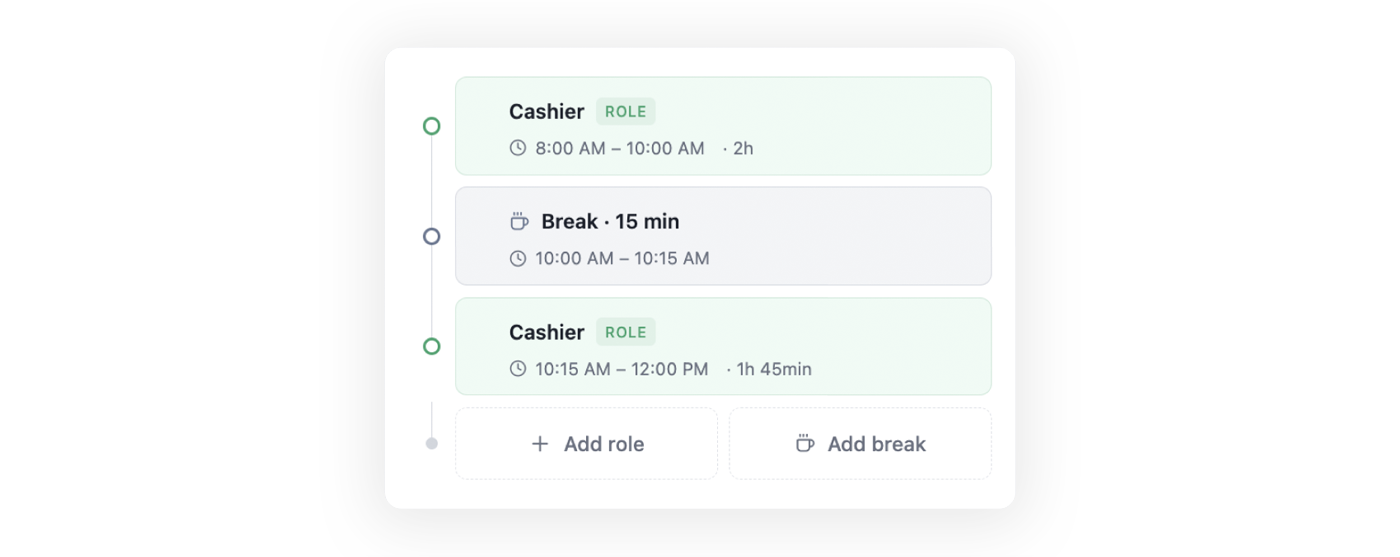
Represent the shift as a timeline of segments, not a single time block.
A shift is not just start and end times. It includes roles, breaks, and sequencing rules. Displaying these as a timeline made it clear that changing one part affected the whole.
Guide the edge cases
Decision
Provide a clear starting point when no shift structure exists, so managers can begin without needing prior context.
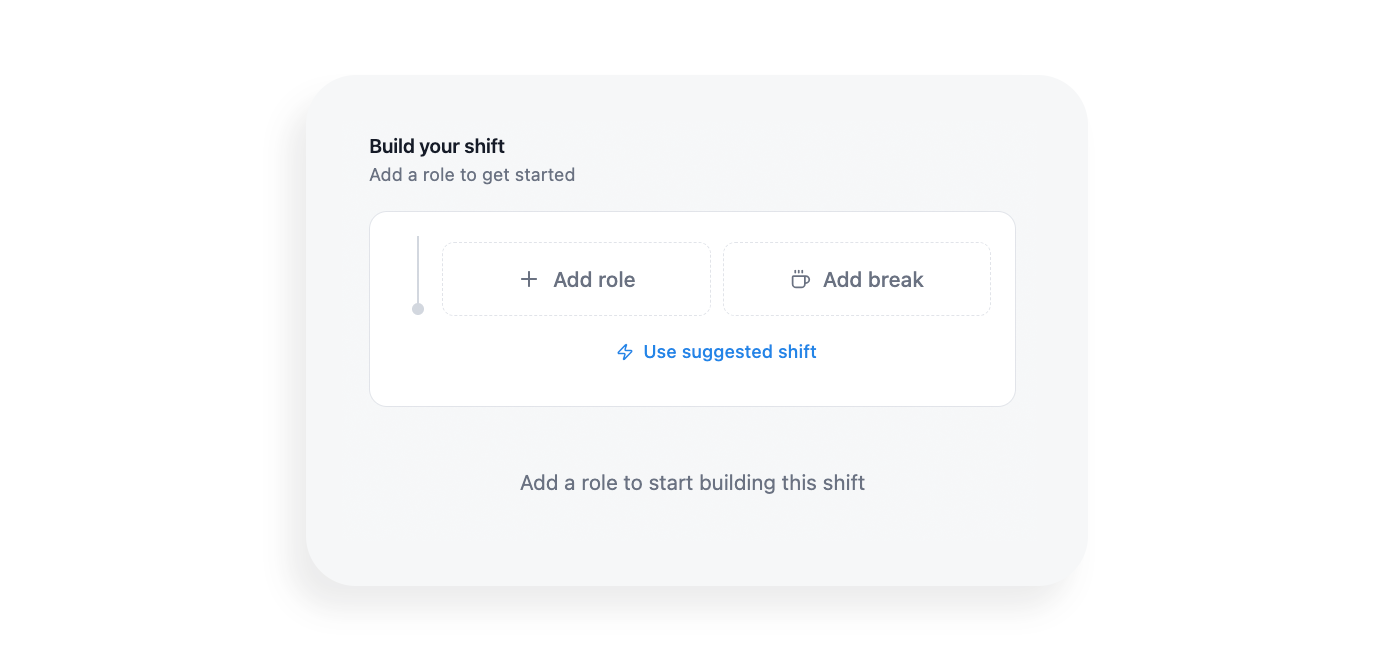
For managers who did not use a suggested shift, the system provided a guided starting point instead of a blank form. Clear prompts like “Add a role to get started,” along with inline actions for roles and breaks, reduced hesitation and helped managers begin structuring a shift with confidence.
Solution part 2 — Filling a shift
Once a shift was defined, managers had to decide how to fill it. The system supported multiple strategies, but they were presented as separate unrelated actions. The goal was to make staffing decisions explicit and predictable.
Lead with a recommendation
Decision
Provide a recommended staffing strategy before exposing manual controls.
Managers don’t just need options. They need direction. The recommendation was specific, for example “assign 1, open 1,” with brief context explaining why. Most of the time it was close enough that only minor adjustments were needed.
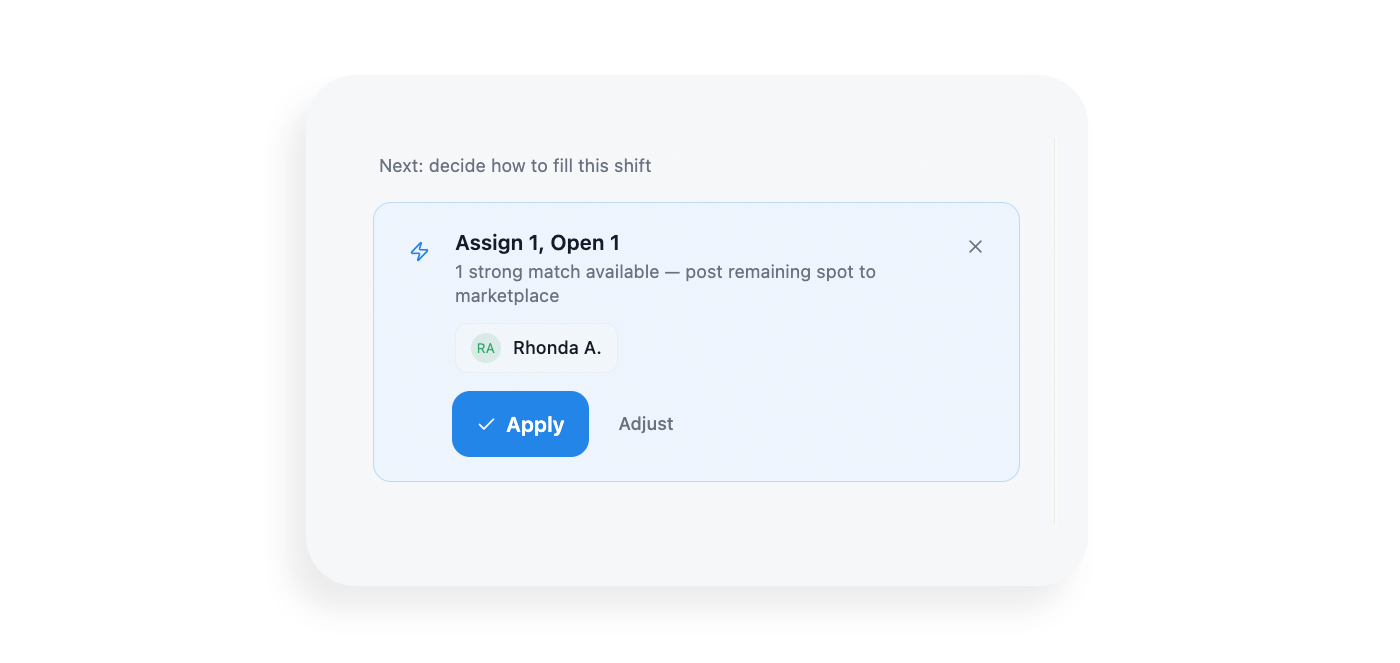
Separate the decision from the controls
Decision
Show the recommended action first. Reveal the full control set only when the manager chooses to adjust.
In the original flow, the recommendation and the override controls appeared at the same time. Restructuring to one decision at a time reduced cognitive load without removing flexibility.
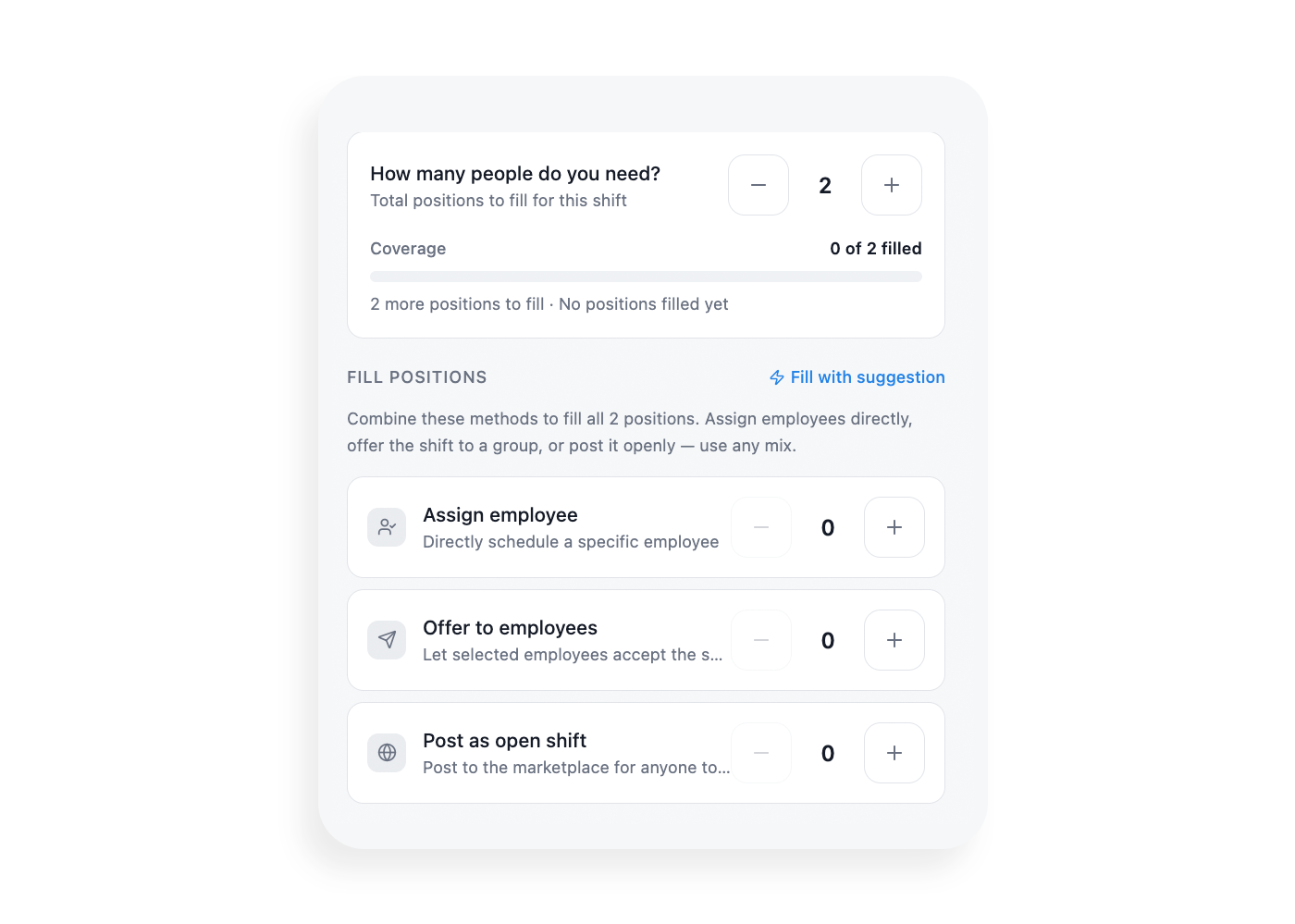
Make coverage visible in real time
Decision
Show how the shift is being filled as decisions are made.
A staffing plan showing how many people were needed, how many were assigned, and what remained open gave managers immediate feedback and removed the need to mentally track coverage across multiple actions.
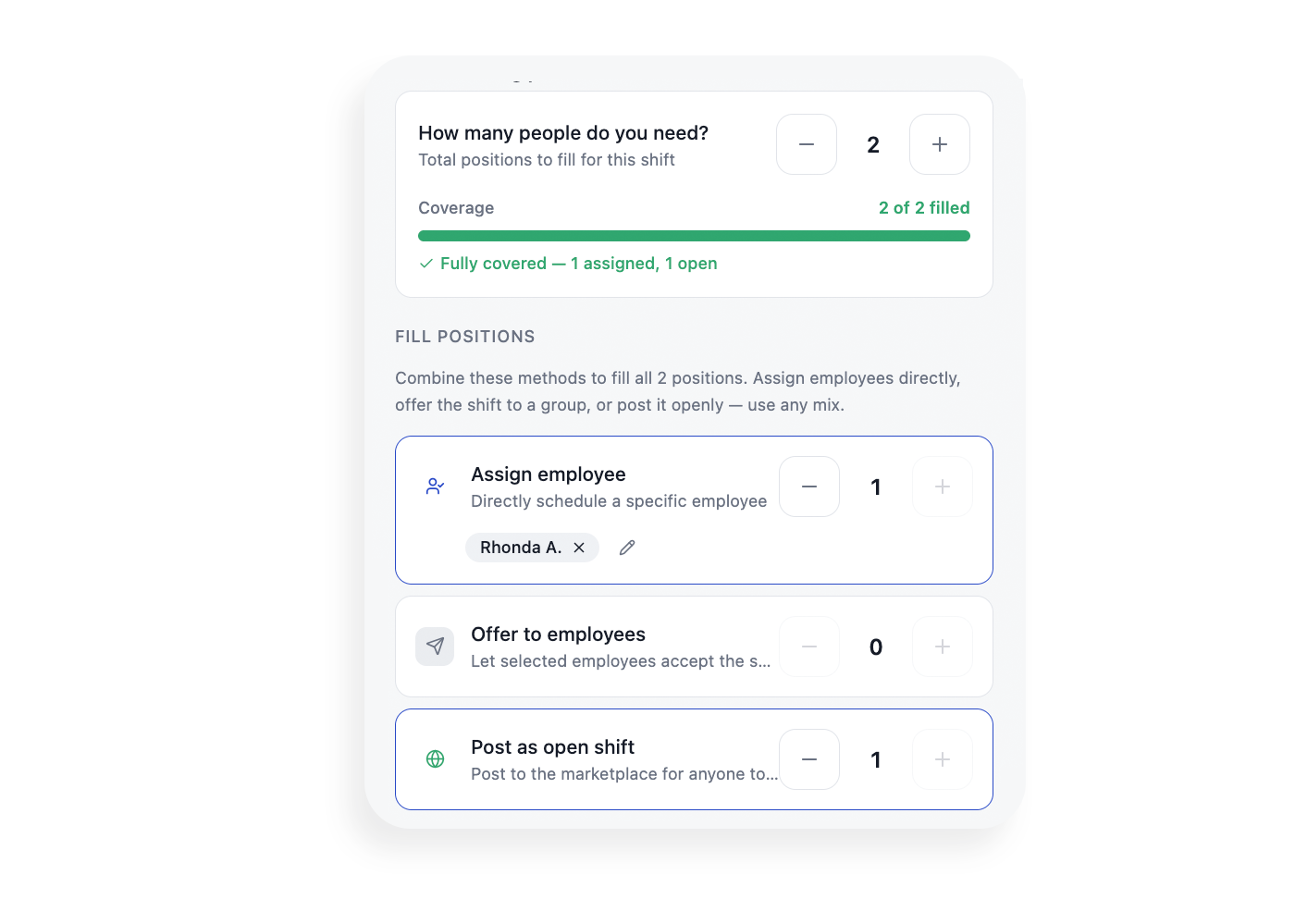
Reframe assign, offer, and open as one system
Decision
Treat these three actions as different strategies for the same outcome, not independent features.
Framing them as parts of a shared staffing plan, each contributing to the same coverage goal, reduced confusion and helped managers combine strategies without guesswork.
What shipping revealed
Getting the core flow into production clarified something that hadn’t fully surfaced in research.
Once managers could define and fill shifts more easily, their attention shifted. In early feedback and follow-up conversations, the questions weren’t about scheduling anymore. They were about what was happening right now.
Manager feedback post-launch
"Who hasn't shown up yet?"
"Where are we short right now?"
"Who's on break next?"
The problem had evolved. Scheduling covered more than planning shifts. Managers needed visibility into real-time operations, into what was happening now, not just what was planned.
This became the foundation for the next phase of work: a day-of view that surfaces live coverage gaps, employee status across clocked in, on break, and absent, and upcoming risks before they become problems. The goal is to extend scheduling from a planning tool into a decision-support system for daily operations.
Impact and Validation
The goal was to improve decision clarity and reduce trial and error, leading to better adoption and retention.
70%
faster decision-making
With suggested shifts and staffing recommendations, managers no longer started from scratch. Most accepted a suggestion and made small adjustments.
30%
less trial and error
Making shift structure and staffing logic visible meant managers could understand outcomes before committing, not after.
60%
better coverage awareness
The staffing plan gave managers an accurate, real-time picture of whether their schedule met operational needs.
Restored
system trust
With real-time feedback and visible rules, managers could adjust schedules without worrying about breaking something they couldn't see.
How we validated these results
In a 2025 operational audit, we surveyed 450 floor managers using the redesigned engine. Participants were asked to complete 12 high-stakes scheduling tasks to measure the impact on decision speed, labor compliance, and manual workaround reduction compared to legacy baseline data.
* A Note for Recruiters & Hiring Managers
This case study is a high-level overview of my approach to improving complex operational systems. It focuses on decision-making, trade-offs, and experience design rather than visual polish alone
I would be happy to walk you through a deep dive of this project during a 1:1 interview.
Quick wins
Fewer blocked schedules
Managers no longer hit dead ends when assigning shifts. When someone couldn’t be scheduled, the system showed what was missing and what needed to change, allowing issues to be resolved instead of retried.
Clear eligibility rules
Training, credentials, availability, and task requirements were made visible in context, so managers could immediately understand who was eligible to work and why.
Less trial-and-error
Instead of testing multiple combinations, managers were guided toward valid options from the start, reducing repeated attempts and wasted time.
No more workarounds
With eligibility and suggestions built directly into the flow, managers no longer relied on spreadsheets, notes, or memory to manage scheduling decisions.
Role
Decision support design
Product strategy
UX architecture
UX and UI
Team & Partners
Architect • Performance Strategy
Data Science • Predictive Logic
Product Manager • Roadmap Influence
Customer success • Domain experts
Senior Designer • Lead
Duration
- Total Project: 9 Months (Concept to Global Scale)
MVP Release: 3 Months (Core Scheduling & Compliance)